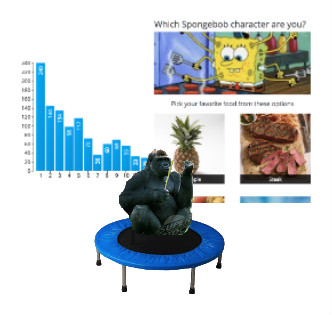
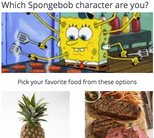
1Beta is Here! BlogIt's taken me countless long nights and forgoing weekend adventures to finally reach this point. It all began when I couldn't find any good answers to medical related questions on Quora. Answer after answer were from doctors touting their own services to be the best when all studies I later combed through proved otherwise. I knew there had to be a better solution. Users shouldn't have to resort to continually scouring through verbose studies for high quality information. This led to letting all users edit all posts by default, with the plan to allow some tags to restrict who can edit what (like posts with the tag "Blog"), and potentially allowing users to turn off the community edit feature if absolutely necessary. I'm still working that out. In addition to wanting to provide a collaborative method to edit content, I realized that there is an abundance of hastily created websites dedicated to one component out on the web. A character counting website. An image color picker website. Creating an entire website dedicated to such a small task seems futile. It dawned on me that allowing users to build small components in addition to editing data could really help the user find what they need. Thanks to ever increasing browser security, and successful roughly similar implementations exclusively for coders (such as jsfiddle ), I knew it was possible. Now that I'm finally releasing it for Beta, I'm amazed at how far it's come. There's a long ways to go, and I'm sure everything will go wrong at some point, but it's great to be here. Launch of Beta will be on July 11th I'll be writing a blog post about once a week. I'll discuss upcoming changes, posts and components I've made, and more. Last night I spent a few hours creating a quiz component. It will need updates, and it's shown me that the process of adding a component can be stilted when the component is complicated. I'll be working on that in the coming months. I swear I don't want this site to be the next buzzfeed. Here it is in action:@john1021 views7/8/2018 0Creating components Form of Good MetaComponents are pieces of HTML, CSS, and JS that can be added to posts or other components. They allow for customization by giving users custom fields to input data into. This post will discuss all parts of a component. The title is required, and must be 4 to 20 characters long. The description is required, and must be 20 to 255 characters. It appears in searches, so it should describe the purpose it serves, and any benefits and limits to using it. For instance, if you were creating a bar graph, it would be useful to mention if it allows for certain customizations such as colors of the bars, and if there is a limit on the number of bar that may be added. The details section is optional. It displays after a component has been selected, and above the data that is requested from the user. Relevant info about how the component works, and customization options go here. Continuing with the bar graph example, you could write that if a bar color is not specified, blue is used, and that for customization, the bars have the class 'bar' that may be edited by adding a <style> element to their post. Line breaks are conserved in details, so you can separate topics into different parts. User-Entered Data is also optional. When used, each field in the row is required. The fields are: The different data types are: All user-entered data becomes a part of an object for your code. Each component has a unique id, and this id is embedded into the variable of this user-entered data object. If the component's id is "iOK0H", the variable for your component is "dataiOK0H" (will be used as an example throughout this doc). This is done to prevent collisions with other components, and it is recommended that "dataiOK0H" or "iOK0H" be used in your variables, html ids, and class names. To allow for multiple instances of your component to be added to one post, every instance of "dataiOK0H" has the localId of your component in that post inserted into the middle. Use "dataiOK0H" in ids, classes, and variables to make it unique. If you wish for all instances to be customized at the same time, use "iOK0H" in the class name. This allows you to have a class name unique to your component, but not unique to that instance. When a component is added to a post, it is given a localId (starts at 0 and auto-increments). This localId is visible in the code editor, so the user can use it if necessary (described later). If your component is the third added, it will have a localId of 2. Before your code is run, all instances of "dataiOK0H" will be replaced with "data2iOK0H". You can let users custom style your components by mentioning class names and ids in the Detail section of the component page. If you give classes unique names (by using "dataiOK0H" in them), you'll have to tell users that they have to insert the localId into the class name. So if your class is named "dataiOK0H-wrapper", you can tell users to customize it by using the class "data{localId}iOK0H-wrapper". Unlike posts, components cannot be used or seen in search results until they are approved. This is to prevent malicious code from becoming widespread before being deleted, and potentially diminishing the UX for users visiting posts that had a component deleted retroactively. To ensure your component is approved, refrain from using external JS files that could be changed maliciously in the future. Only repositories on unpkg.com - like jQuery, React, and other npm packages - will be allowed. Aside from common social media, all other script urls are blocked by our Content-Security-Policy. If you have another site you'd like to include scripts from, please submit feedback (in the dropdown menu in the upper right hand corner when you log in). Add the following to enable react: <script src='https://unpkg.com/react/umd/react.production.min.js'></script> <script src='https://unpkg.com/react-dom/umd/react-dom.production.min.js'></script> When testing, use the following: <script src='https://unpkg.com/react/umd/react.development.js'></script> <script src='https://unpkg.com/react-dom/umd/react-dom.development.js'></script> Example of React in a component When a new version of a component is approved, changes will not automatically propagate to posts using that component. Posts will have to be updated individually. This was done because updated components may no longer fit in as well with the post, and can change user-entered data formatting. Because pages are loaded two different ways, you must plan accordingly. If you need to wait for the page to load to examine or manipulate elements, you will have to check to see if the document has loaded already before adding a window load event listener: if (document.readyState !== 'complete') { this.listenerSet = true; // when using React window.addEventListener('load', this.loadData); } else { this.listenerSet = false; // when using React this.loadData(); } For removing the listener in React: componentWillUnmount() { if (this.listenerSet) { window.removeEventListener('load', this.loadData); } } Without React: if (document.readyState !== 'complete') { window.addEventListener('beforeunload', function (event) { window.removeEventListener('load', this.loadData); }); }@john858 views7/2/2018 0If a tree falls in a forest, and no one is around to see or hear it, does it make a sound? Science, Question, PhilosophyThis is a classic philosophical question regarding observation and existence. If no one is there to see, smell, or in any way detect an event, how do we know if it occurred, or in this case, does the tree even exist at all? It raises several questions like "is sound only a sound if a person hears it?" From a scientific stance, it is thought to have occurred. If it can at some point be observed to be in a fallen state, it is believed to have caused sound waves to penetrate through the air. But from a philosophical standpoint, this is essentially an unanswerable question. An interesting related topic is that at the subatomic scale, this question of whether something exists if it is not observed is less straightforward. Particles act differently when they are directly observed than when they are not. This is known as the "observer effect". Particles seem to act as theoretical versions of themselves until they observed. It's above my full level of understanding, but here's a video about it that will blow your mind:@retropmac1005 views7/14/2018 0Welcome to Beta Testing Form of Good MetaThe purpose beta testing is to find out what works and what doesn't. Are there broken features? Is something missing, or are activities like making posts, components, and adding components to posts too complicated? Any little feedback helps. Check out how adding components to posts works ( click here for a simple walkthrough), and make some posts. Posts can be as simple as asking a question without providing an answer, or writing about something you know or like. There is virtually no limit to what you can post (except for things like violence, etc (oh and please no nudity or other NSFW items as nothing has been built to tag those as unsafe or to automatically hide them from those that haven't opted in)). If you see any bugs, or disruptive content, please provide feedback. I also encourage you to look at the "Edit"/"View Code" page to see what other people have made. Some posts will be full of complex HTML and JavaScript, but others will simply import components like graphs, a table of contents, lists, and more. One of the main purposes of this site is to allow non-coders to use complex components without knowing how they work. For starters, take a look at the "Code" of this post. (Click the "View Code" button in the upper right hand corner of this post). You'll see that it uses the "Table of Contents" component, and then only makes use of the menu above the code to add headers, paragraphs, links, and line breaks (the "<BR>" symbol will put your content on a new line). The feedback button is on the bottom right side of your screen.@john777 views7/15/2018